Recently I came across Doppler and I wanted to share a specific use case for it.
I'm currently spending some time on a side project where I'm using Prefect to manage my workflows. Despite the fact that I'm not using Prefect in production, I still want to be able to manage my secrets in a secure way and Prefect manages secrets using blocks which I'm not a fan of.
Why not Prefect Secret blocks directly?
- No environment parity between local and cloud
- Secrets tightly coupled to Prefect runtime
- Harder to share secrets across non-Prefect services
That's where Doppler comes in.
TL;DR
If you already use Prefect and Doppler, skip directly to The code for the implementation.
Source code
The source code for this example is available on GitHub.
Doppler
Doppler is a centralized secret manager that syncs environment-specific secrets to applications via environment variables, SDKs, or CLI, with built-in support for access control, rotation, and multiple deployment environments.
Setting up Doppler account
To start using Doppler, it's necessary to create an account. This setup is pretty straightforward and I recommend to follow the official documentation to complete it. Note that you don't need to provide credit card information to start using the service.
Setting up a project
-
For this example, I'll create a project called
my-project: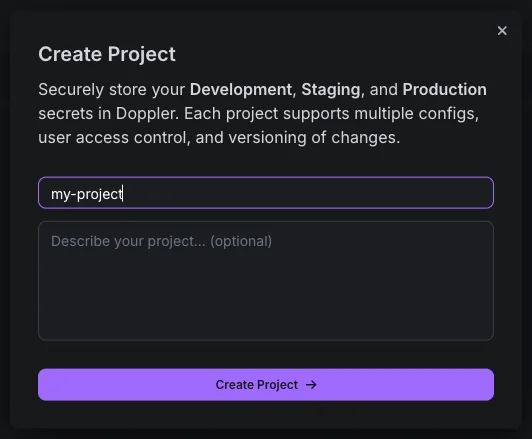
-
As soon as we create the project, Doppler automatically creates three environments and their slugs: Development(
dev), Staging(stg) and Production(prd).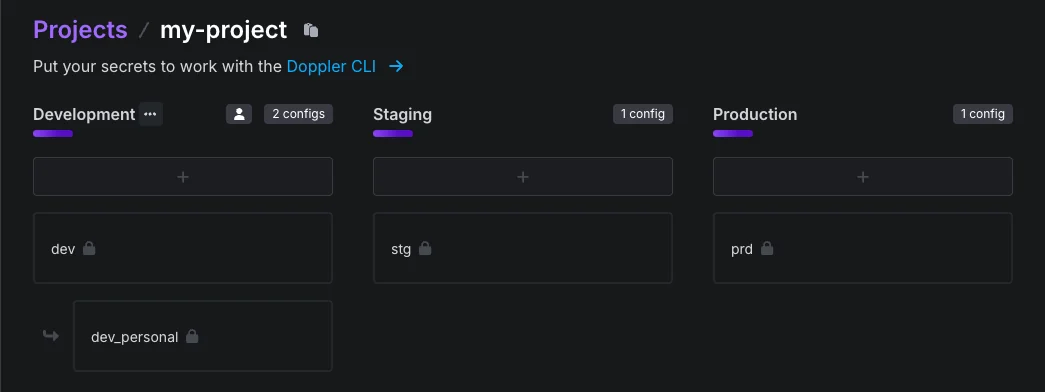
-
Let's define a secret called
SECRET_API_KEYand we'll set the value to1234567890. After entering the value, click the Save button.
-
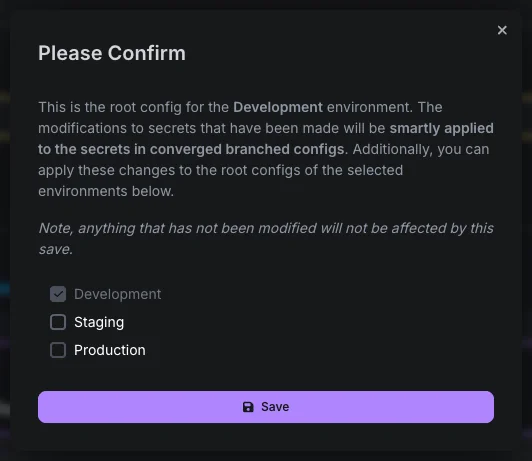
After saving, Doppler will ask whether you want to propagate this secret. You can choose to propagate it to all environments or just to the selected ones.
Setting up an access token
We also need to create an access token to be able to retrieve the secrets from the project.
-
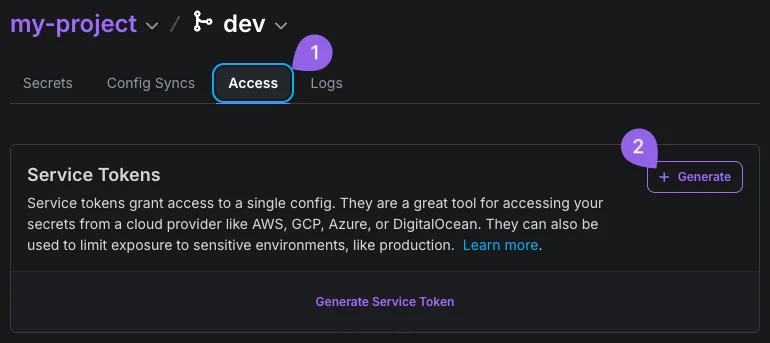
On the Doppler dashboard, select the project and click on "Access", then click on "Generate":
-
Then enter with a name for the access token and click on "Generate", then copy the access token.
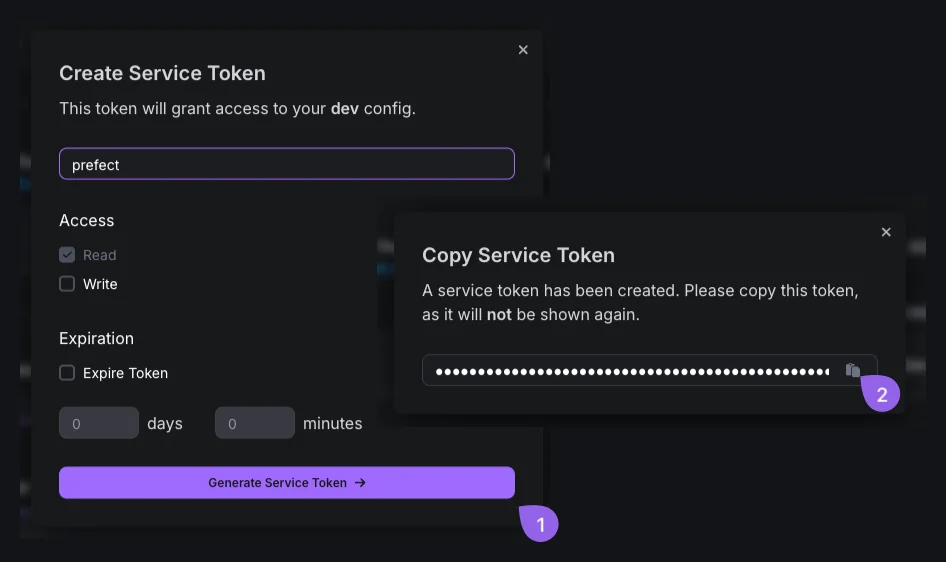
For security reasons, it's recommended to scope the access token for read-only.
-
For now, save the access token in a secure place. We'll need it later.
Prefect
Prefect is a workflow management tool that allows you to manage workflows in a pythonic and reliable way. I'd recommend to check the official documentation for more information.
For simplicity, I'll assume you already have a Prefect project set up.
Prefect blocks
Prefect blocks are a persistence mechanism for configuration and credentials, including secrets. It gets the job done but for this example, we want to delegate the secrets management to Doppler.
In order to do that, let's create a new block called doppler-config to store the Doppler configuration.
In the Prefect UI, let's access the blocks section:
-
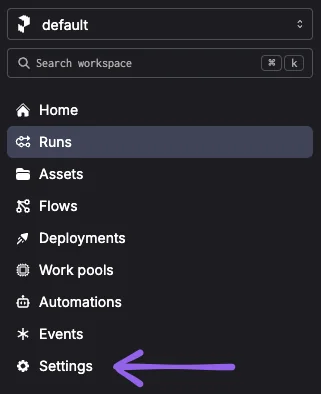
First click on "Settings" on the sidebar:
-
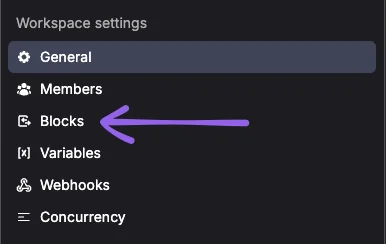
Then click on "Blocks":
-
Then click on "Block +"

-
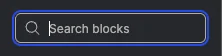
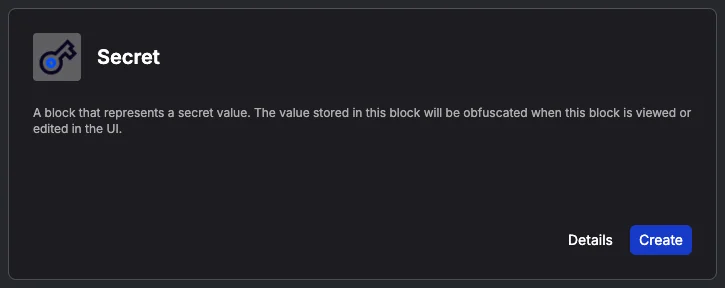
Then search for "Secret"
-
Then click on "Secret"
-
Now we need to fill the form with the following information:
-
Name:
doppler-config -
Type:
JSON -
Value:
{
  "project": "my-project",
  "config": "dev",
  "access_token": "sv.*********************"
}
Remember to replace the
access_tokenwith the one you copied earlier.
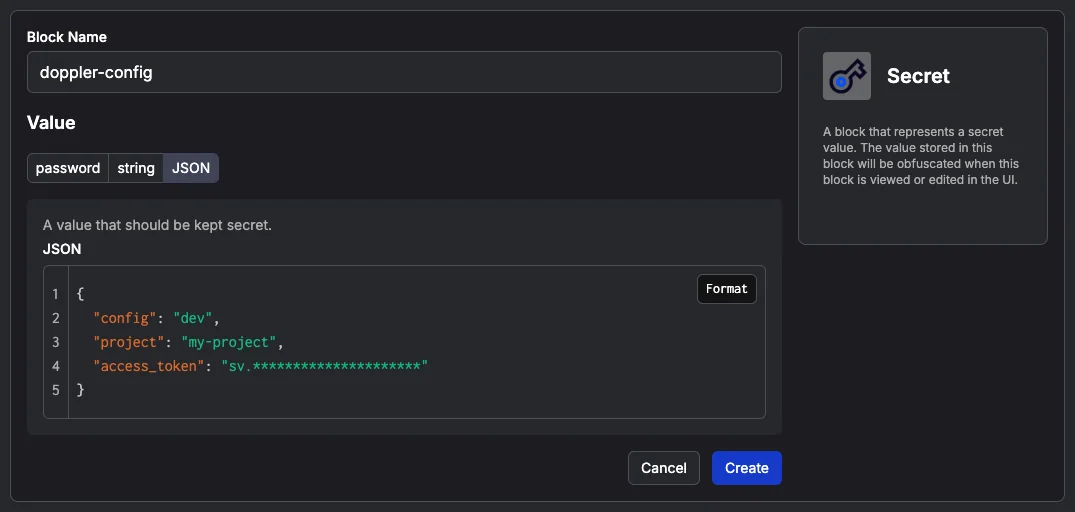
Then click on "Create"
-
The code
With the setup complete, let's look at the code.
Requirements
Before diving into the code, we'll need to have a few things in place:
- Python 3.10+ installed
uvorpipto install the dependencies
Note: While using
pipit's recommended to use a virtual environment to avoid conflicts with other projects.python -m venv .venv source .venv/bin/activate
Install the dependencies:
# Using uv
uv add doppler-sdk prefect python-dotenv pydantic pydantic-settings

# Using pip
pip install doppler-sdk prefect python-dotenv pydantic pydantic-settings
Whispering our secrets to Prefect
First things first, let's create a src/settings.py file to load our configuration from environment variables.
# src/settings.py

from pydantic_settings import BaseSettings

class Settings(BaseSettings):
    secret_api_key: str
Now we can define the function that brings our secrets to life.
# src/settings.py

from io import StringIO

from dopplersdk import DopplerSDK
from dotenv import load_dotenv
from prefect.blocks.system import Secret

def load_secrets_from_doppler():
    secret_block = Secret.load("doppler-config")
    doppler_config = secret_block.get()
    doppler = DopplerSDK(access_token=doppler_config["access_token"])
    response = doppler.secrets.download(
        config=doppler_config["config"],
        project=doppler_config["project"],
        format="env",
    )
    stream = StringIO(response.text)
    load_dotenv(stream=stream)
This function performs the following steps:
-
First, we load the secret block from Prefect and get the configuration.
secret_block = Secret.load("doppler-config") doppler_config = secret_block.get() -
Then we initialize the Doppler SDK with the access token.
doppler = DopplerSDK(access_token=doppler_config["access_token"]) -
Then we download the secrets from Doppler with
.envformat and save it in a string buffer.response = doppler.secrets.download( config=doppler_config["config"], project=doppler_config["project"], format="env", ) stream = StringIO(response.text) -
Finally we load the environment variables from the string buffer.
load_dotenv(stream=stream)
Until now, we have the secrets loaded into the environment variables. Let's see how to use them in our flow.
Loading the secrets in our flow
Now we can load the secrets in our flow.
# src/my_flow.py

from prefect import flow

from .settings import Settings, load_secrets_from_doppler


@flow
def my_flow():
    load_secrets_from_doppler()
    settings = Settings()
    print(settings.secret_api_key)


if __name__ == "__main__":
    my_flow()
-
First we load the the secrets from Doppler into the environment variables.
load_secrets_from_doppler() -
Then we load the settings from the environment variables using the
Settingsclass.settings = Settings()It's mandatory to load the secrets into environment variables before instantiating the
Settingsclass. -
Finally we print the secret API key using the
settingsobject.print(settings.secret_api_key)
Now let's run the flow.
# Using uv
uv run python src/my_flow.py

# Using pip with virtual environment
python src/my_flow.py
We should see the secret API key printed in the console:
prefect.engine - View at https://app.prefect.cloud/account/24a1d5dd-fc9f-4a8e-a812-42e5648ba921/workspace/5495293d-ab61-4b84-9ad7-84c2d203ce73/runs/flow-run/06949dca-954e-7189-8000-d8b048e75ad8
Flow run 'amaranth-caterpillar' - Beginning flow run 'amaranth-caterpillar' for flow 'my-flow'
Flow run 'amaranth-caterpillar' - View at https://app.prefect.cloud/account/24a1d5dd-fc9f-4a8e-a812-42e5648ba921/workspace/5495293d-ab61-4b84-9ad7-84c2d203ce73/runs/flow-run/06949dca-954e-7189-8000-d8b048e75ad8
1234567890
Flow run 'amaranth-caterpillar' - Finished in state Completed()
That's it! We have the secrets loaded into the environment variables and we can use them in our flow.
Note that even we are running the flow locally, if the prefect profile is set to run in the cloud, the flow will load the block from the cloud.
Conclusion
In this post, we explored how to use Doppler to manage secrets in Prefect by centralizing secret management outside the orchestration layer. We used a single Prefect Secret block only to store Doppler configuration, while delegating all actual secret management to Doppler and exposing secrets to the application via environment variables.
Although this approach does not completely eliminate the use of Prefect Secret blocks, it reduces them to a single, stable integration point. In return, Doppler provides significantly more flexibility, control, and scalability for managing secrets, especially as a project grows to medium or large size.
The complete and runnable example of the code used in this post is available on Github: https://github.com/jonatasleon/prefect-doppler-config.
I hope you found this post helpful. If you have any questions, feel free to reach out to me on LinkedIn.